YUEBINS API v1
Introduction
Our platform is the primary channel for customers to place orders, track and manage stored value products. The API endpoint is only available to authorized customers and requires our team to set up and provide credentials. Customers with the necessary credentials can then use the signature to access the API endpoint.
Environments:
- Production Host is: https://open.yuebins.com
Request Packet Structure
The Interface Takes Only Four Arguments
| Parameters | Types | RequiredFields | Description |
|---|---|---|---|
| accessKey | string | Y | It needs to be fetched in the management background |
| timestamp | string/Number | Y | timestamp (1727677791714) |
| params | string | Y | Business parameters, if not, please pass an empty object |
| sign | string | Y | All but the sign field are required to participate in the signature (F56A209869A2501521E0D0692628CEDD) |
All interface requests should be in JSON format, and set the request header to application/json. Interface responses should also be in json format
Example Request Packet
{
    "accessKey": "1e1b3a4535669e9e1c33f7995ece92a1",
    "timestamp": 1729517880172,
    "params": {
        "orderNo":"Q-202403011410421570-5921-mRfG",
      },
    "sign": "2B5589025EB0B0BD180B85B7A92D4715"
}
Example Of A Successful Response Packet
{
  "status": "success",
  "message": "Request succeeded",
  "data": {
    // Successfully Returned Data
    "orderNo": "Q-20241021163927-6589-B46SOu",
    "items": [
      {
        "brandCode": "4X125",
        "productId": "137T150",
        "productFaceValue": 10,
        "quantity": 100,
        "countryCode": "USD",
        "cards": [
          {
            "id": 32027796,
            "serialNumber": null,
            "cardCode": "XVZ3X339WL2QN67QN",
            "pin": null,
            "expirationDate": "3000-01-01T00:00:00",
            "status": "Sold"
          }
        ]
      }
    ],
    "status": "Succeeded",
    "createdDate": "2024-10-21T08:39:27.762Z",
    "total": 1956.15,
    "errorMessage": "",
    "currency": "USD"
  },
  "error": null
}
Example Of A Failed Response Packet
{
  "status": "error",
  "message": "REQUEST_EXPIRED",
  "data": null,
  "error": {
    "code": "REQUEST_EXPIRED",
    "details": "REQUEST_EXPIRED"
    // Detailed Error Information
  }
}
Obtain necessary credentials:
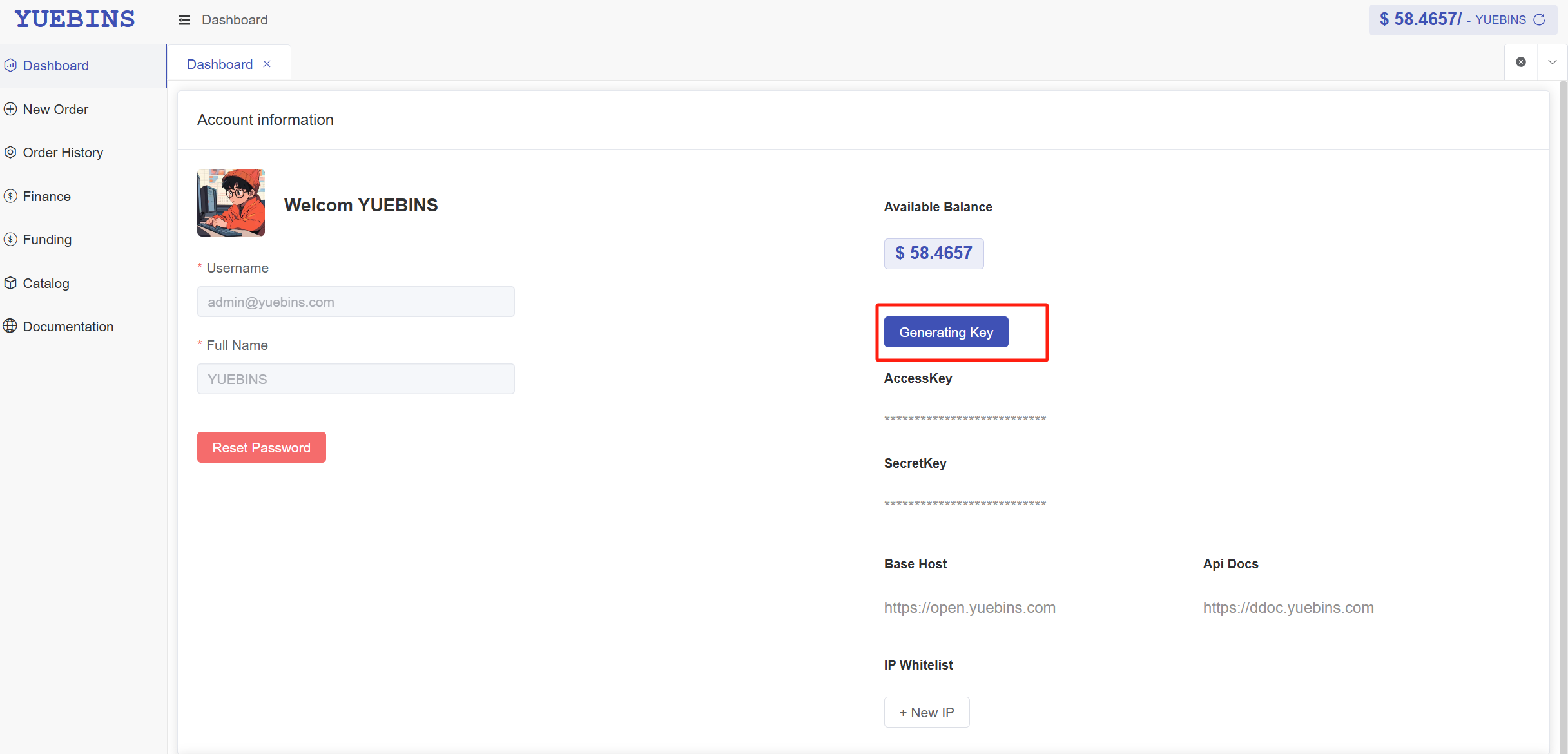
Log in to the management backend homepage and click Generating Key to view the AccessKey and SecretKey. It is worth noting that you can only view it once, please keep it properly. If you forget to obtain it again, the old certificate will become invalid.
- Management Background https://openc.yuebins.com
generateSignature:
This method generates a request signature to ensure the security and integrity of the request. It processes the request parameters to produce an MD5 signature, commonly used for API request authentication.
Parameters
params(Object, default{}):- Description: Contains key-value pairs of parameters to be signed. It can include basic types and objects/arrays.
- Example:
{ "orderNo":"2338586511371085287-06" }
- timestamp (Number):
Description: The current Unix timestamp in milliseconds. It is used to ensure the uniqueness of the signature.Example:1698251234567
secretKey(String):Description: The key used to generate the signature. It should be kept on the server-side to avoid exposure.Example:"b9c24591a72dfeb3898b244696be5524a24414b647db16a29f33470974765b52"
Returns
- String: The generated MD5 signature in uppercase.
Processing Flow
Filter Non-empty Parameters:
- Remove undefined and null values from the params object, keeping only valid parameters.
Sort:
- Sort the filtered parameters by their key names in alphabetical order to ensure signature consistency.
Generate Query String:
- Convert the sorted key-value pairs into key=value format, URL encode them, and concatenate them into a query string.
Concatenate String:
- Append the timestamp and secret key to the query string to form the string to be signed.
Generate MD5 Signature:
- Use Node.js's crypto module to compute the MD5 hash of the concatenated string and return the result in uppercase.
Notes
- Ensure that the
secretKeyis kept confidential to avoid exposure. - Make sure the timestamp is the current time to prevent replay attacks.
- For complex parameters (like objects or arrays), the method uses
JSON.stringifyto ensure the accuracy of the signature.
Example Code (Node.js)
const crypto = require('crypto');
function generateSignature(params = {}, timestamp, secretKey) {
const filteredParams = Object.keys(params)
.filter(key => params[key] !== undefined && params[key] !== null)
.reduce((obj, key) => {
obj[key] = params[key];
return obj;
}, {});
const sortedKeys = Object.keys(filteredParams).sort();
const queryString = sortedKeys
.map(key => `${key}=${encodeURIComponent(JSON.stringify(filteredParams[key]))}`)
.join('&');
const stringA = `${queryString}×tamp=${timestamp}&secretKey=${secretKey}`;
return crypto.createHash('md5').update(stringA).digest('hex').toUpperCase();
}
eg:
const timestamp = Date.now();
const params = {}
const secretKey = '1e1b3a4535669p9e1c33f7ea56292a1'
const sign = generateSignature(params, timestamp, secretKey)
//sign: F56A209869A2501521E0D0692628CEDD
Example Code (PHP)
function generateSignature($params = [], $timestamp, $secretKey) {
$filteredParams = array_filter($params, function($value) {
return $value !== null && $value !== undefined;
});
ksort($filteredParams);
$queryString = http_build_query(array_map('json_encode', $filteredParams));
$stringA = "{$queryString}×tamp={$timestamp}&secretKey={$secretKey}";
return strtoupper(md5($stringA));
}
----------------------
eg:
$params = [
"productId" => "1379150",
"quantity" => 1,
"value" => 2
];
$timestamp = time() * 1000; // Get current Unix timestamp in milliseconds
$secretKey = "your-secret-key";
$signature = generateSignature($params, $timestamp, $secretKey);
echo $signature;
Example Code (Java)
import java.security.MessageDigest;
import java.net.URLEncoder;
import java.util.*;
public class SignatureGenerator {
public static String generateSignature(Map<String, Object> params, long timestamp, String secretKey) throws Exception {
// Filter and sort parameters
params.values().removeIf(Objects::isNull);
List<String> sortedKeys = new ArrayList<>(params.keySet());
Collections.sort(sortedKeys);
StringBuilder queryString = new StringBuilder();
for (String key : sortedKeys) {
if (queryString.length() > 0) queryString.append("&");
queryString.append(key).append("=").append(URLEncoder.encode(params.get(key).toString(), "UTF-8"));
}
String stringA = queryString.toString() + "×tamp=" + timestamp + "&secretKey=" + secretKey;
return toUpperCase(md5(stringA));
}
private static String md5(String input) throws Exception {
MessageDigest md = MessageDigest.getInstance("MD5");
byte[] messageDigest = md.digest(input.getBytes());
StringBuilder hexString = new StringBuilder();
for (byte b : messageDigest) {
String hex = Integer.toHexString(0xff & b);
if (hex.length() == 1) hexString.append('0');
hexString.append(hex);
}
return hexString.toString();
}
private static String toUpperCase(String input) {
return input.toUpperCase();
}
}
--------------------
eg:
import java.util.HashMap;
import java.util.Map;
public class Main {
public static void main(String[] args) throws Exception {
Map<String, Object> params = new HashMap<>();
params.put("productId", "1379150");
params.put("quantity", 1);
params.put("value", 2);
long timestamp = System.currentTimeMillis(); // Current Unix timestamp in milliseconds
String secretKey = "your-secret-key";
String signature = SignatureGenerator.generateSignature(params, timestamp, secretKey);
System.out.println(signature);
}
}
API Limitations :
Get Catalog:
Our server permits 4 requests per hour for retrieving the catalogue. (Product mapping to your end is required.)
Catalog prices, if applicable, are updated on an hourly basis.
Get Order:
- For fetching orders, our server allows 120 requests per minute.
Place Order:
- Placing orders is restricted to 2 requests per second on our server.
Exchange Rate:
Our server authorizes 20 requests per minute for obtaining exchange rates.
Exchange rates are updated on an hourly basis.
Other APIs:
- Default allowance of 1 request per second for all the other APIs.
Public Interface
Get Accounts
Getting Account Information
- url:
/integration/v1/accounts - method:
POST - headers:
Content-Type: application/json - body:
{
  "accessKey": "1e1b3a4535669e9e1c33f7ea5ece92a1",
  // String
  "timestamp": 1729477156855,
  // String or Number
  "params": {},
  // Object
  "sign": "F56A209869A2501521E0D0692628CEDD"
  // String
}
- response:
{
  "status": "success",
  "message": "Request succeeded",
  "data": {
    "account": "YOU Client Name",
    "fullName": "Tom",
    "currency": "USD",
    "balance": "1000",
    // Balance $1000
    "isActive": true
  },
  "error": null
}
List Of Cards Interfaces
Card type users, please connect the following interface
Get Catalogs
Getting catalog Information
- url:
/integration/v1/catalog - method:
POST - headers:
Content-Type: application/json - body:
{
  "accessKey": "1e1b3a4535669e9e1c33f7ea5ece92a1",
  // String
  "timestamp": 1729477156855,
  // String or Number
  "params": {},
  // Object
  "sign": "F56A209869A2501521E0D0692628CEDD"
  // String
}
- response:
{
  "status": "success",
  "message": "Request succeeded",
  "data": {
    "brands": [
      {
        "brandId": "1",
        "brandName": "Ticket Norway",
        "logoUrl": "https://open.yuebins.com/v1/common/files/preview/img/4559.jpg",
        "currencyCode": "NOK",
        "countryCode": "NO",
        "modifiedDate": "2024-10-20T06:08:12.408Z",
        "products": [
          {
            "productId": "1524770",
            "productName": "Ticket NO 2000 NOK",
            "status": true,
            "price": {
              "min": 2045.3328,
              "max": 2045.3328,
              "currencyCode": "NOK"
            },
            "minFaceValue": 2000,
            "maxFaceValue": 2000,
            "count": null,
            "country": "NO",
            "currency": "NOK",
            "modifiedDate": "2024-10-21T20:00:10.166Z"
          }
        ]
      }
    ],
    "total": 1
    // Total Number Of Products
  },
  "error": null
}
Get order
Query Detailed Order Information By OrderNumber
- url:
/integration/v1/orders - method:
POST - headers:
Content-Type: application/json - body:
{
  "accessKey": "1e1b3a4535669e9e1c83f7ea5ece92a1",
  "timestamp": 1729564322886,
  "params": {
    "orderNo": "Q-20241021103927-6509-B46SOu"
  },
  "sign": "4352C7DEC8ED7B09CC5A843AC3F169F1"
}
- response:
{
  "status": "success",
  "message": "Request succeeded",
  "data": {
    "orderNo": "Q-20241021103927-6089-B490Ou",
    "items": [
      {
        "brandCode": "4125",
        "productId": "1379150",
        "productFaceValue": 15,
        "quantity": 50,
        "countryCode": "USD",
        "cards": [
          {
            "id": 32027800,
            "serialNumber": null,
            "cardCode": "XXN8X054CWYV3DVLG",
            "pin": null,
            "expirationDate": "3000-01-01T00:00:00",
            "status": "Sold"
            // Gift Card Status
          }
          ...
        ]
      }
      ...
    ],
    "status": "Succeeded",
    // Order Status
    "createdDate": "2024-10-21T08:39:27.762Z",
    "total": 1956.15,
    // Total Order Cost  $ 1956.15
    "errorMessage": "",
    "currency": "USD"
  },
  "error": null
}
Order Status Explanation:
Created: The initial status is assigned to an order upon its creation in the system. At this stage, the order is ready for processing.
Processing: Indicates that the system has accepted the order, and it is in progress.
Pending: The order is awaiting further action or approval before it can proceed to the next stage. This status is often temporary.
Succeeded: Signifies that the order has been successfully completed, and the requested operation or transaction has been carried out without any issues.
Failed: Indicates that the order encountered an error or faced an obstacle during processing, preventing successful completion.
PartialFailed: A hybrid status indicates that certain aspects of the order were successful, while others encountered issues or failures. This status provides a nuanced view of the order's overall outcome.
Remarks: If you are getting the status Pending, this means that the order is currently being processed, wait until you get another status.
Response Remarks:
Purchase Outcome:In some instances, not all cards may be successfully purchased. In such cases, a failure message is returned specifically for the cards that were not acquired. Order Status, Order Items Status Indicators:
The order can have the following statuses:
Succeeded: Successfully processed.
Created: Order is created but processing has not commenced.
Failed: The order encountered an issue, and no cards were purchased.
PartialFailed: Some cards were bought, but others encountered issues.
Total Amount Charged:The "Total" field in the response indicates the total amount of money charged from the account in its respective currency.
Card Status Explanation:
- Paused:Cards in a paused status are awaiting retrieval from different channels.
- Sold:Cards that have been successfully purchased.
- Failed:Cards that encountered failures during the purchase attempt and no charges will be applied to them.
- Created:Indicates that order processing for the respective card has not started yet.
- Processing:Denotes that the system is currently processing the card within the order.
Place Order
- url:
/integration/v1/checkout - method:
POST - headers:
Content-Type: application/json - body:
{
  "accessKey": "1e1b3a4535669e996c33f7ea5ece92a1",
  "timestamp": 1729514300743,
  "params": {
    "notificationUrl": "https://www.example.com/api/notification",
    "products": [
      {
        "productId": "1374086",
        "quantity": 1,
        "value": 10
      }
    ]
  },
  "sign": "637C69CC0D01B39339BBDD5F04B000A3"
}
Request Remarks
notificationUrl:After placing an order, whether it is successful or Other States, we will request your notificationUrl by post, and carry the orderNo and secretKey in the body. We will only notify you once. Please go to the request order details (/integration/v1/orders) interface to refresh the order status immediately after receiving this notification.Please make sure that your notificationUrl is able to access normally, if no notificationUrl is passed, no notification will be made, and you will get the order status not in time.
ProductId Validation:The ProductId must align with the unique identifier of a product from the catalogue.
Value Range Validation:The 'Value' parameter must fall within the inclusive range of MinFaceValue to * MaxFaceValue*. Note that this range is based on the face value of the product, not its price.
Currency Discrepancy Handling: When purchasing from an account with a currency different from the listed product price in the catalogue, an exchange rate will be applied.
Exchange Rate Application Example:
- Example scenario:
- Desired purchase: a product priced at 9.5 EUR with a face value of 10.
- Using a USD account.
- Exchange rate from EUR to USD: 1.10.
- Calculated product price: 9.5 * 1.10 = 10.45 USD.
- The deducted amount will be in USD from your account.
- Example scenario:
Limits:
- Maximum Cards per Order: The maximum allowable number of cards in a single order is set at 500
- Maximum Quantity per Order: Each order is constrained by a maximum quantity of 500 cards.
response:
{
  "status": "success",
  "message": "Request succeeded",
  "data": {
    "orderNo": "Q-20241021103927-6089-B490Ou",
    "status": "Succeeded"
  },
  "error": null
}
notificationUrl:
We will pass the following parameters to your notificationUrl, then you can use the secretKey to determine if the request is valid and immediately request the order detail interface ((/integration/v1/orders)) to get the latest order status
// body
 {
    "orderNo": "Q-20241091103927-6089-B490Ou",
    "secretKey": "729e8eca835823b9ad82cf635058b575943dce7c607a2fbeff09754b9ff71e3"
  }
exchange-rates
the endpoint returns a list of all exchange rates based on USD.
- url:
/integration/v1/exchange-rates - method:
POST - headers:
Content-Type: application/json - body:
{
  "accessKey": "1e1b3a4535669e9e1c33f7ea5ece92a1",
  // String
  "timestamp": 1729477156855,
  // String or Number
  "params": {},
  // Object
  "sign": "F56A209869A2501521E0D0692628CEDD"
  // String
}
- response:
{
  "status": "success",
  "message": "Request succeeded",
  "data": [
    {
      "currencyCode": "AED",
      "currencyRate": 0.27497957
    },
    ...
  ],
  "error": null
}
Get Brands
- url:
/integration/v1/brands - method:
POST - headers:
Content-Type: application/json - body:
{
  "accessKey": "1e1b3a4535669e9e1c33f7ea5ece92a1",
  // String
  "timestamp": 1729477156855,
  // String or Number
  "params": {},
  // Object
  "sign": "F56A209869A2501521E0D0692628CEDD"
  // String
}
- response:
{
  "status": "success",
  "message": "Request succeeded",
  "data": [
    {
      // brand info
    },
    ...
  ],
  "error": null
}
List Of NetEase Interfaces
NetEase type users, please connect the following interface
Get NetEase Catalogs
Getting catalog Information
- url:
/integration/direct/catalog - method:
POST - headers:
Content-Type: application/json - body:
{
  "accessKey": "1e1b3a4535669e9e1c33f7ea5ece92a1",
  // String
  "timestamp": 1729477156855,
  // String or Number
  "params": {},
  // Object
  "sign": "F56A209869A2501521E0D0692628CEDD"
  // String
}
- response:
{
  "status": "success",
  "message": "Request succeeded",
  "data": [
    {
      "game_id": "13",
      "game_name": "QB",
      "is_server": 1,
      // server: 1 Not required  2 required
      "is_user": 1,
      // Game Account:  1 Not required  2 required
      "server": [
        "默认区服"
        // server name
      ],
      "products": [
        // product list
        {
          "productId": "172",
          // product ID
          "productName": "QB",
          // product name
          "price": 0.1741
          // product price
        }
      ]
    }
    // other game ...
  ],
  "error": null
}
Get NetEase order
Query Detailed Order Information By OrderNumber
- url:
/integration/direct/orders - method:
POST - headers:
Content-Type: application/json - body:
{
  "accessKey": "1e1b3a4535669e9e1c83f7ea5ece92a1",
  "timestamp": 1729564322886,
  "params": {
    "orderNo": "Q-20241021103927-6509-B46SOu"
  },
  "sign": "4352C7DEC8ED7B09CC5A843AC3F169F1"
}
- response:
{
  "status": "success",
  "message": "Request succeeded",
  "data": {
    "orderNo": "Q-20241029161916-3084-MHWRo5",
    // order number
    "status": "Succeeded",
    // order status : Created Processing Succeeded Failed
    "createdDate": "2024-10-29T08:19:16.284Z",
    // order creation time
    "total": "0.8705",
    // order total amount
    "rechargeStatus": "1",
    // recharge status:  0 NoRecharge 1 Success 2 Failure
    "server": "Default",
    // server name
    "rid": "1840354092",
    // recharge game account
    "number": "5",
    // recharge quantity
    "card": null,
    // card code  S06549-7F7D-60BM-MAGQS
    "currency": "USD",
    // currency
    "createdBy": "Alice",
    // order creator
    "productId": "172",
    // product ID
    "productName": "QB",
    // product name
    "game_name": "QB",
    // game name
    "game_id": "13"
    // game ID
  },
  "error": null
}
Order Status Explanation:
Created: The initial status is assigned to an order upon its creation in the system. At this stage, the order is ready for processing.
Processing: Indicates that the system has accepted the order, and it is in progress.
Succeeded: Signifies that the order has been successfully completed, and the requested operation or transaction has been carried out without any issues.
Failed: Indicates that the order encountered an error or faced an obstacle during processing, preventing successful completion.
Remarks: If you are getting the status Processing, this means that the order is currently being processed, wait until you get another status.
Place NetEase Order
- url:
/integration/direct/checkout - method:
POST - headers:
Content-Type: application/json - body:
{
  "accessKey": "1e1b3a4535669e996c33f7ea5ece92a1",
  "timestamp": 1729514300743,
  "params": {
    "notificationUrl": "https://www.example.com/api/notification",
    // NotificationUrl Required
    "game_id": "1374086",
    // GameId Required
    "rid": "1840354096",
    // Recharge Game Account Required
    "productId": "13",
    // ProductId Required
    "number": 1
    // Recharge Quantity Required
  },
  "sign": "637C69CC0D01B39339BBDD5F04B000A3"
}
Request Remarks
notificationUrl:Callback address, if we recharge successfully, we will POST the notificationUrl you filled in, and carry the orderNo 、secretKey and other parameters in the body, we will only notify once. Please order after receiving the notice to request details interface (/integration/direct/orders) to refresh the order status, please make sure that your notificationUrl can normal visit, if there is no incoming notificationUrl, will not to notice, You will not be able to get the order status in time.
game_id Validation:The game_id must align with the unique identifier of a product from the catalogue.
productId Validation:The ProductId must align with the unique identifier of a product from the catalogue.
number Validation:The test for the number of orders is at least 1 and at least 5 if it is QB.
response:
{
  "status": "success",
  "message": "Request succeeded",
  "data": {
    "orderNo": "Q-20241021103927-6089-B490Ou",
    // Order number
    "status": "Processing",
    // Most of them will receive the processing status after successful submission, please wait for the callback notification to get the latest order information
    "total": "9.00"
    // Total amount
  },
  "error": null
}
notificationUrl:
We will pass the following parameters to your notificationUrl, then you can use the secretKey to determine if the request is valid and immediately request the order detail interface ((/integration/direct/orders)) to get the latest order status
// body
 {
    secretKey: "729e8eca835823b9ad82cf635058b575943dce7c607a2fbeff09754b9ff71e3", // SecretKey
    orderNo: "Q-20241091103927-6089-B490Ou", // Order number
    status: "Succeeded", // Order status : Created Processing、Succeeded、Failed
    card:"", // Card Code
    rid:"1840354093", // Recharge Game Account
    number:"5", // Recharge Quantity
    game_id:"13", // GameId
    productId:"38", // ProductId
    server:"Default", // Server
    totalAmount:"13.00", // Total Amount
    successTime:"2024-10-29T08:19:16.284Z", // Successful Time
    rechargeStatus:"1", // Recharge Status
    errorMessage:"",  // If it fails, there will be detailed failure information
  }